Showing posts with label Source Code C#. Show all posts

Friday, June 9, 2017

Google Translator C#

Google Translator C#

What is it?

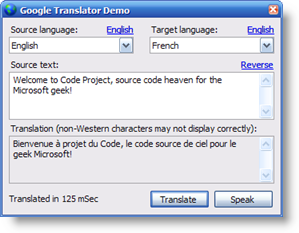
GoogleTranslator in actionGoogleTranslator is an object that allows you to translate text using the power of Google's online language tools. The demo app also allows you to easily perform a reverse translation. The app can be used as a poor man's resource translator for simple phrases, but you'd be wise to confirm the translation with a native speaker before using the results.

How do I use it?

You use GoogleTranslator by constructing it and calling its Translate() method.
 
    using RavSoft.GoogleTranslator;
    
    Translator t = new GoogleTranslator();
    string translation = t.Translate ("Hello, how are you?", "English", "French");
    Console.WriteLine (translation);
    Console.WriteLine ("Translated in " + t.TranslationTime.TotalMilliseconds + " mSec");
    Console.WriteLine ("Translated speech = " + t.TranslationSpeechUrl);

How it works

GoogleTranslator works by directly invoking Google's translation API called by its online translation form and parsing the results.
 
    // Initialize
    this.Error = null;
    this.TranslationSpeechUrl = null;
    this.TranslationTime = TimeSpan.Zero;
    DateTime tmStart = DateTime.Now;
    string translation = string.Empty;

    try {
        // Download translation
        string url = string.Format ("https://translate.googleapis.com/translate_a/single?client=gtx&sl={0}&tl={1}&dt=t&q={2}",
                                    Translator.LanguageEnumToIdentifier (sourceLanguage),
                                    Translator.LanguageEnumToIdentifier (targetLanguage),
                                    HttpUtility.UrlEncode (sourceText));
        string outputFile = Path.GetTempFileName();
        using (WebClient wc = new WebClient ()) {
            wc.Headers.Add ("user-agent", "Mozilla/5.0 (Windows NT 6.1) AppleWebKit/537.36 " +
                                          "(KHTML, like Gecko) Chrome/41.0.2228.0 Safari/537.36");
            wc.DownloadFile(url, outputFile);
        }

        // Get translated text
        if (File.Exists (outputFile)) {

            // Get phrase collection
            string text = File.ReadAllText(outputFile);
            int index = text.IndexOf (string.Format(",,\"{0}\"", Translator.LanguageEnumToIdentifier (sourceLanguage)));
            if (index == -1) {
                // Translation of single word
                int startQuote = text.IndexOf('\"');
                if (startQuote != -1) {
                    int endQuote = text.IndexOf('\"', startQuote + 1);
                    if (endQuote != -1) {
                        translation = text.Substring(startQuote + 1, endQuote - startQuote - 1);
                    }
                }
            }
            else {
                // Translation of phrase
                text = text.Substring(0, index);
                text = text.Replace("],[", ",");
                text = text.Replace("]", string.Empty);
                text = text.Replace("[", string.Empty);
                text = text.Replace("\",\"", "\"");
            }

            // Get translated phrases
            string[] phrases = text.Split (new[] { '\"' }, StringSplitOptions.RemoveEmptyEntries);
            for (int i=0; (i < phrases.Count()); i += 2) {
                string translatedPhrase = phrases[i];
                if (translatedPhrase.StartsWith(",,")) {
                    i--;
                    continue;
                }
                translation += translatedPhrase + "  ";
            }

            // Fix up translation
            translation = translation.Trim();
            translation = translation.Replace(" ?", "?");
            translation = translation.Replace(" !", "!");
            translation = translation.Replace(" ,", ",");
            translation = translation.Replace(" .", ".");
            translation = translation.Replace(" ;", ";");

            // And translation speech URL
            this.TranslationSpeechUrl = string.Format ("https://translate.googleapis.com/translate_tts?ie=UTF-8&q={0}&tl={1}&total=1&idx=0&textlen={2}&client=gtx",
                                                       HttpUtility.UrlEncode (translation),
                                                       Translator.LanguageEnumToIdentifier (targetLanguage),
                                                       translation.Length);
        }
    }
    catch (Exception ex) {
        this.Error = ex;
    }

    // Return result
    this.TranslationTime = DateTime.Now - tmStart;
    return translation;
As you can see, the logic used to parse the JSON result is very simple!

Speaking the translation

The Translator object retrieves the URL that will stream the spoken version of the translation. The demo app speaks this content by navigating to this URL in a hidden browser control. As mentioned in the preamble, because Google limits the speech to common words in a few languages, don't be surprised if the demo plays dumb when you try to speak your translated text!

Revision History

  • 18 Mar 2016
    Switched to Google Translate plugin APIs.  Fix identified by User-12366202.  Thank you!
  • 6 Aug 2015
    Corrected parsing logic.  Fix identified by Member 11019371.  Thank you!
  • 6 May 2015
    Corrected parsing logic to fix translation of single words.
  • 5 May 2015
    Corrected Google URL.
    Removed all external dependencies.
  • 9 Mar 2014
    Switched to using Google's JSON translation APIs.
    Added TranslationTime and TranslationSpeakUrl properties.
    Tweaked demo app UI to assist in reverse translation and resetting an English source and target.
  • 13 Jan 2013
    Added support for current full language set.
    Refixed bug that limited translation to first sentence.
    Fixed a bug that caused reverse translation to fail when accented characters were present.
  • 10 Mar 2010
    Added support for current full language set.
    Fixed bug that limited translation to first sentence.
  • 15 Feb 2010
    Even more parsing tweakage.
  • 28 Mar 2009
    More parsing tweakage.
  • 20 Mar 2007
    Tweaked parsing logic to conform to changes at Google's website.
  • 15 Jan 2006
    Initial version.

Download Source Code


Thursday, November 24, 2016

ListView C# - Ví dụ nhỏ sử dụng ListView

ListView là một control dùng để hiển thị một danh sách các item với các biểu tượng. Chúng ta có thể sử dụng một  ListView để tạo ra một giao diện giống như cửa sổ bên phải của Windows Explorer. Bài viết này sẽ trình bày các cách sử dụng cơ bản đối với control này.

- Đầu tiên các bạn thiết kế cho mình 1 giao diện như sau :
ListView C# - Ví dụ nhỏ sử dụng ListView

Sau đó ta có 1 file text với nội dung như sau:

Đây là 1 file text chứa nội dung ID và tên người dùng của 1 groups nào đó và thông số có phải adm của groups đó không. Dữ liệu này mình lấy test trên Graph Explore của Facebook.

Thực hành: Nhét hết dữ liệu vào ListView để được kết quả như sau:


Bắt đầu ý tưởng:
- Đầu tiên ta click vào button và chọn file text cần hiển thị lên ListView => Sử dụng Event Click của button bằng cách kích đúp vào control button.

- Tiếp đó là ta sẽ dùng File IO để nhập xuất dữ liệu từ ngoài vào trong chương trình. Sau đó nhét dữ liệu đó vào trong 1 danh sách List<string>.

- Tiếp theo là xử lý các chuỗi rồi đưa vào List

Thực hiện:


Ta tạo một Phương thức có tên là ImportData.
Khởi tạo một đối tượng dialog trong object OpenFileDialog

OpenFileDialog dialog = new OpenFileDialog();
dialog.Filter = ".txt|*.txt"; // Bộ lọc chỉ được import file txt
dialog.Title = "Open File Text Facebook"; // Đặt tiêu đề là Open File Text Facebook cho ô cửa sổ mở chọn file.

 if (dialog.ShowDialog() == DialogResult.OK)
                {
                    listInformationFacebook = new List<string>(File.ReadAllText(dialog.FileName).Split('\n'));

                    listView1.View = View.Details; // Hiển thị bảng nhìn dưới dạng View.Details
                    listView1.GridLines = true; // Có để gạch dòng như excel hay không
                    listView1.FullRowSelect = true; // Chọn 1 ô tô kín hàng hay không.
                    listView1.Columns.Add("ID Facebook", 120); // Đặt tên cho ô đầu tiên
                    listView1.Columns.Add("Name Facebook", 150); // Đặt tên cho ô thứ 2
                    listView1.Columns.Add("Administrator", 70); // Đặt tên cho ô thứ 3
                    progressBar1.Maximum = listInformationFacebook.Count; // Set thông số cho processBar bằng số lượng item
                    foreach (var item in listInformationFacebook)
                    {
                        ListViewItem listview; // khởi tạo đối tượng listview để lấy dữ liệu từ mảng dữ liệu
                        string[] arrItem = item.Split('|'); // Cắt theo luật item1 | item2 | item3
                        listview = new ListViewItem(arrItem); // Nhét mảng vào trong ListViewItem
                        listView1.Items.Add(listview); // Nhét ListViewItem vào control ListView
                        progressBar1.Value += 1; // Tăng processbar sau mỗi vòng lặp
                    }
                }

Vậy là xong ví dụ nhỏ. Nếu các bạn có câu hỏi thì cmt ở dưới. Nếu hay thì like không thì chia sẻ cho bạn bè các bạn cùng nhau học tập.

Source code: https://drive.google.com/file/d/0B5ABUSGfAEUbTlctVmhabzdrdHc/view?usp=sharing
File Text: https://drive.google.com/file/d/0B5ABUSGfAEUbaEluS0NkVklNeTg/view?usp=sharing


Tuesday, March 8, 2016

Get HTML code from a website C# | Nhận mã HTML từ một trang web C #

Get HTML code from a website C# | Nhận mã HTML từ một trang web C #


- Trong 1 số trường hợp làm phần mềm thì chắc hẳn ai cũng phải va chạm tới chương trình nào đấy cần lấy 1 thông tin nào đấy từ internet về.
- Vậy cách để giải quyết vấn đề này là mình phải lấy html website đó về và tiến hành lọc thông tin cần thiết. Vậy phương pháp nào tối ưu để lấy html về trong ngôn ngữ lập trình C#. Sau đây Cường xin giới thiệu với các bạn các cách như sau:
Cách 1: Sử dụng HttpWebRequest
public static String code(string Url)
{

        HttpWebRequest myRequest = (HttpWebRequest)WebRequest.Create(Url);
        myRequest.Method = "GET";
        WebResponse myResponse = myRequest.GetResponse();
        StreamReader sr = new StreamReader(myResponse.GetResponseStream(), System.Text.Encoding.UTF8);
        string result = sr.ReadToEnd();
        sr.Close();
        myResponse.Close();

        return result;
 }
Cách 2:  Tốt nhất, bạn có thể sử dụng lớp WebClient để đơn giản hóa công việc của bạn

using System.Net;

using (WebClient client = new WebClient())
{
     client.Encoding = Encoding.UTF8;
     client.Headers.Add(HttpRequestHeader.UserAgent, "Mozilla/5.0 (Windows NT 10.0; WOW64; rv:47.0) Gecko/20100101 Firefox/47.0");
     client.Headers.Add(HttpRequestHeader.Cookie, webBrowser1.Document.Cookie);
     richTextBox1.Text = client.DownloadString("https://www.facebook.com");
}

Cách 3: Cách được đánh giá là cơ bản trên stackoverflow

using System.Net;
using System.Net.Http;  // in LINQPad, also add a reference to System.Net.Http.dll

WebRequest req = HttpWebRequest.Create("http://google.com");
req.Method = "GET";

string source;
using (StreamReader reader = new StreamReader(req.GetResponse().GetResponseStream()))
{
    source = reader.ReadToEnd();
}

Console.WriteLine(source);
Cách 4: Ngắn gọn không cần mất sức

var html = new System.Net.WebClient().DownloadString(siteUrl)
Cách 5: Dùng Chilkat asembly

Chilkat.Http http = new Chilkat.Http();

bool success;

//  Any string unlocks the component for the 1st 30-days.
success = http.UnlockComponent("Anything for 30-day trial");
if (success != true) {
    Console.WriteLine(http.LastErrorText);
    return;
}

//  Send the HTTP GET and return the content in a string.
string html;
html = http.QuickGetStr("http://www.wikipedia.org/");

Console.WriteLine(html);

- Trên đây là những cách mà mình đã sưu tầm lại được, nếu có những cách mới thì các bạn comment ở dưới nhé. Nếu hay thì share cho bạn bè cùng biết để cùng học tập nào. Hẹn gặp lại các bạn vào tut sắp tới.

Monday, September 7, 2015

Source code Spam Mail C#

Hôm nay mình chia sẻ với các bạn code gửi mail hàng loạt được viết bằng ngôn ngữ C shape và viết trên visual studio 2015

 private void btSend_Click(object sender, EventArgs e)
        {
            if (txtTo.Text.Trim() == "") {
                MessageBox.Show("Null email reveice");
            }
                ThreadStart threadMail = new ThreadStart(new Thread(SendMail).Start);
       
        }
        public void SendMail()
        {
            try
            {
                MailMessage mail = new MailMessage();
                mail.To.Add(txtTo.Text);
                mail.To.Add(txtCCMail.Text);
                mail.From = new MailAddress(txtFromMail.Text);
                mail.Subject = txtSubMail.Text;

                mail.Body = rtbBodyMail.Text;

                mail.IsBodyHtml = true;
                SmtpClient smtp = new SmtpClient();
                smtp.Host = "smtp.gmail.com"; // Thông tin SMTP Server Address
                smtp.Credentials = new System.Net.NetworkCredential
                     (txtUserMail.Text, txtPassMail.Text);
                smtp.Port = 587;

             
                smtp.EnableSsl = true;
                smtp.Send(mail);
            }
            catch (Exception ex)
            {
                MessageBox.Show(ex.Message);
            }
        }

Sunday, September 6, 2015

Download Nhaccuatui 320kb Source Code C#


using System;
using System.Collections.Generic;
using System.ComponentModel;
using System.Data;
using System.Diagnostics;
using System.Drawing;
using System.Linq;
using System.Text;
using System.Text.RegularExpressions;
using System.Threading.Tasks;
using System.Windows.Forms;

namespace GetNhac320NCT
{
    public partial class Form1 : Form
    {
        public Form1()
        {
            InitializeComponent();
        }
        Chilkat.SshTunnel tunnel = new Chilkat.SshTunnel();
        Chilkat.HttpRequest req = new Chilkat.HttpRequest();
        Chilkat.Http http = new Chilkat.Http();
        Chilkat.Global chilkatGob = new Chilkat.Global();
        string codeHTML, codeHTML2;
        private void button1_Click(object sender, EventArgs e)
        {
            bool success = chilkatGob.UnlockBundle("Key bạn phải mua hoặc dùng key dùng thử trên mạng");
            if (success != true)
            {
                MessageBox.Show("Error Unlock");
            }
            // Dùng hàm get HTML của Link nhaccuatui về
            string getHTML = http.QuickGetStr(txtURL.Text);
           
            // cắt token nhaccuatui
            string pattern = "\"nofollow\" key=\"(.+?)\">Tải Nhạc 320 Kbps</a>";
            Regex myRegex = new Regex(pattern);
            Match m = myRegex.Match(getHTML);

            for (int i = 0; m.Groups[i].Value != ""; i++)
            {
                codeHTML = m.Groups[i].Value;
                
            }
            string getHTML2 = http.QuickGetStr("http://www.nhaccuatui.com/download/song/" + codeHTML);
            rtboutput1.Text = getHTML2;


            string pattern1 = "{\"error_message\":\"Success\",\"data\":{\"stream_url\":\"(.+?)\",\"is_charge\":\"false\"},\"error_code\":0,\"STATUS_READ_MODE\":true}";
            Regex myRegex1 = new Regex(pattern1);
            Match m1 = myRegex1.Match(getHTML2);

            for (int i = 0; m1.Groups[i].Value != ""; i++)
            {
                codeHTML2 = m1.Groups[i].Value;
            }
            // show URL download nhaccuatui
            rtboutput1.Text = codeHTML2;
            // Tải nhạc về bằng chrome
            Process.Start("chrome.exe", codeHTML2);
        }
    }
}